Hand Gesture Recognition Example
This Python script is designed to implement gesture recognition using the MediaPipe library in combination with OpenCV. The program captures video from a camera, processes the video frames to detect hand gestures, and displays the results in real time.
Context About MediaPipe
MediaPipe is an open-source framework from Google that allows developers to build pipelines for processing media data such as videos and images. It provides tools for building robust machine learning models that can handle tasks like facial detection, hand tracking, and gesture recognition. This script specifically utilizes the hand tracking capabilities of MediaPipe.
You can try their models online here.
Further documentation about the model can also be found here
The current model only has seven gestures. Take a look at this repo for community contributions for different gestures
Installation
You can install the required libraries using pip. Open your terminal or command prompt and execute the following commands:
pip install opencv-python
pip install mediapipe
Next, download the model from here and place it at the root of your code.
Explanation of the Model
The following information is from here
The hand landmark model bundle detects the keypoint localization of 21 hand-knuckle coordinates within the detected hand regions. The model was trained on approximately 30K real-world images, as well as several rendered synthetic hand models imposed over various backgrounds. See the definition of the 21 landmarks below:
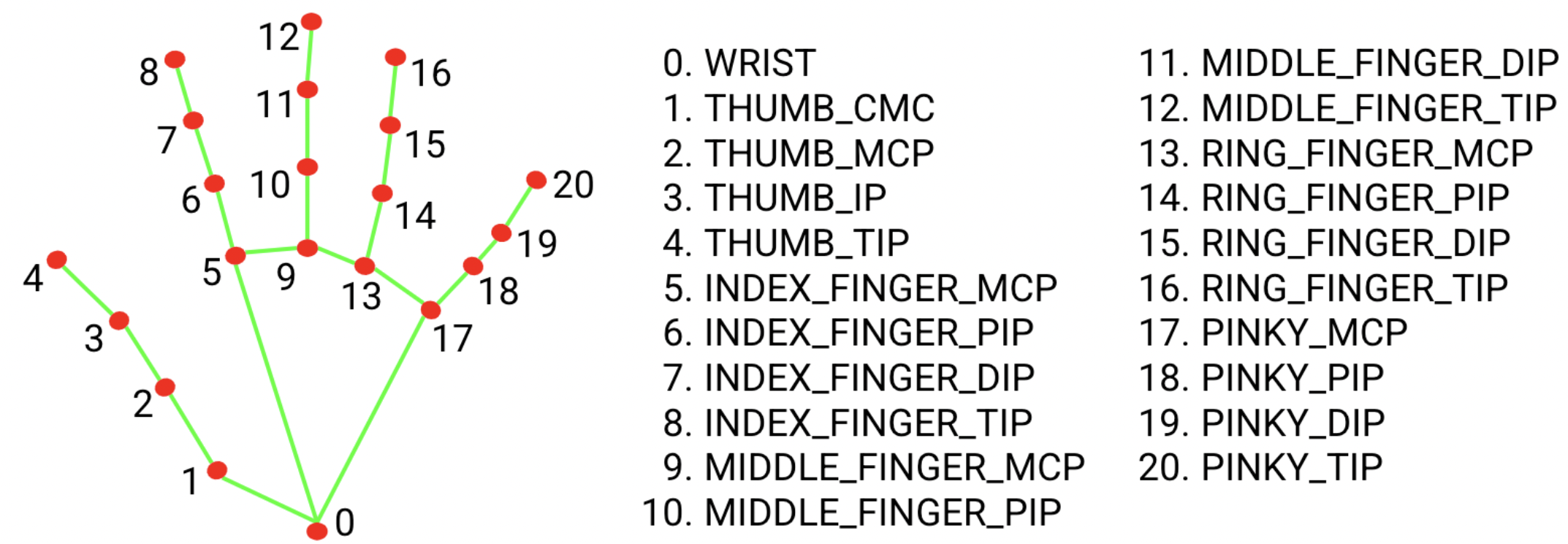
The model has seven inbuilt hand gestures, which are as follows:
0 - Unrecognized gesture, label: Unknown
1 - Closed fist, label: Closed_Fist
2 - Open palm, label: Open_Palm
3 - Pointing up, label: Pointing_Up
4 - Thumbs down, label: Thumb_Down
5 - Thumbs up, label: Thumb_Up
6 - Victory, label: Victory
7 - Love, label: ILoveYou
Explanation of the Code
First create a new Python file, for example main.py, and copy the following code into it.
1. Imports and Initialization:
- Essential modules are imported (
cv2for OpenCV functionalities,mediapipefor MediaPipe solutions, andpaho.mqttfor MQTT communication). - MediaPipe solutions for hand tracking and drawing utilities are initialized.
import sys
import time
import cv2
import mediapipe as mp
from mediapipe.framework.formats import landmark_pb2
from mediapipe.tasks import python
from mediapipe.tasks.python import vision
2. Configuration Parameters:
- Configuration parameters are defined, including the path to the gesture recognition model, the number of hands to track, camera settings, and parameters for result visualization.
Make sure to change the MODEL_PATH to the correct relative path.
# Initialize MediaPipe solutions
mp_hands = mp.solutions.hands
mp_drawing = mp.solutions.drawing_utils
mp_drawing_styles = mp.solutions.drawing_styles

# Default parameters
MODEL_PATH = r'02 Code\01 Python\02 Camera\01 Gestures\gesture_recognizer.task'
NUM_HANDS = 1
MIN_HAND_DETECTION_CONFIDENCE = 0.5
MIN_HAND_PRESENCE_CONFIDENCE = 0.5
MIN_TRACKING_CONFIDENCE = 0.5
CAMERA_ID = 0
FRAME_WIDTH = 640
FRAME_HEIGHT = 480

# Global variables for FPS calculation
COUNTER, FPS = 0, 0
START_TIME = time.time()

# Visualization parameters
ROW_SIZE = 50  # pixels
LEFT_MARGIN = 24  # pixels
TEXT_COLOUR = (0, 0, 0)  # black
FONT_SIZE = 1
FONT_THICKNESS = 1
FPS_AVG_FRAME_COUNT = 10

# Label box parameters
LABEL_TEXT_COLOUR = (255, 255, 255)  # white
LABEL_FONT_SIZE = 1
LABEL_THICKNESS = 2

# Recognition results
recognition_frame = None
recognition_result_list = []
3. Functions:
3.1 Model Loading and Initialization def load_model():
- Loads the gesture recognition model from a specified file path using MediaPipe's advanced options.
- Initializes and configures the recognizer with customizable confidence levels and tracking settings.
def load_model(model_path: str):
 """
 Loads the gesture recognition model from the specified file path.

 Parameters:
     model_path (str): The path to the gesture recognition model file.

 Returns:
     vision.GestureRecognizer: An instance of the gesture recognizer.
 """
 # Open the model file in binary read mode
 with open(model_path, 'rb') as f:
     model = f.read()  # Read the model file content into a variable

 # Create base options for the gesture recognizer with the model asset buffer
 base_options = python.BaseOptions(model_asset_buffer=model)

 # Define options for the gesture recognizer
 options = vision.GestureRecognizerOptions(
     base_options=base_options,  # Use the base options with the loaded model
     running_mode=vision.RunningMode.LIVE_STREAM,  # Set the running mode to live stream
     num_hands=NUM_HANDS,  # Number of hands to detect
     min_hand_detection_confidence=MIN_HAND_DETECTION_CONFIDENCE,  # Minimum confidence for hand detection
     min_hand_presence_confidence=MIN_HAND_PRESENCE_CONFIDENCE,  # Minimum confidence for hand presence
     min_tracking_confidence=MIN_TRACKING_CONFIDENCE,  # Minimum confidence for hand tracking
     result_callback=save_result  # Callback function to handle the recognition results
 )
 # Create and return the gesture recognizer instance with the specified options
 return vision.GestureRecognizer.create_from_options(options)
- Real-time Processing and Display
def display_results():- Captures and processes video frames in real-time.
- Applies gesture recognition on each frame and updates the display with detected gestures and tracking landmarks.
- Calculates and displays FPS to monitor performance.
def display_results(current_frame):
   """
 Displays the gesture recognition results on the given video frame.

 Parameters:
     current_frame (ndarray): The current frame from the video stream where gestures are to be recognized and displayed.

 Returns:
     None
 """
 # Check if there are any recognition results
 if recognition_result_list:
     # Iterate through each hand detected in the first recognition result
     for hand_index, hand_landmarks in enumerate(recognition_result_list[0].hand_landmarks):
         # Calculate the bounding box of the hand by finding min and max coordinates
         x_min = min([landmark.x for landmark in hand_landmarks])
         y_min = min([landmark.y for landmark in hand_landmarks])
         y_max = max([landmark.y for landmark in hand_landmarks])

         # Convert normalized coordinates (ranging from 0 to 1) to pixel values
         frame_height, frame_width = current_frame.shape[:2]
         x_min_px = int(x_min * frame_width)
         y_min_px = int(y_min * frame_height)
         y_max_px = int(y_max * frame_height)

         # Check if there are any gesture classification results for the detected hands
         if recognition_result_list[0].gestures:
             gesture = recognition_result_list[0].gestures[hand_index]
             category_name = gesture[0].category_name
             score = round(gesture[0].score, 2)
             result_text = f'{category_name} ({score})'

             # Print gesture classification result to the console
             print(f'Gesture: {category_name} ({score})')

             # Compute the size of the text to be displayed
             text_size = cv2.getTextSize(result_text, cv2.FONT_HERSHEY_DUPLEX, LABEL_FONT_SIZE, LABEL_THICKNESS)[0]
             text_width, text_height = text_size

             # Calculate the position to draw the text (above the hand bounding box)
             text_x = x_min_px
             text_y = y_min_px - 10  # Adjust this value as needed

             # Ensure the text position is within frame boundaries
             if text_y < 0:
                 text_y = y_max_px + text_height

             # Draw the gesture classification result on the frame
             cv2.putText(current_frame, result_text, (text_x, text_y), cv2.FONT_HERSHEY_DUPLEX, LABEL_FONT_SIZE, LABEL_TEXT_COLOUR, LABEL_THICKNESS, cv2.LINE_AA)

         # Draw hand landmarks on the frame
         hand_landmarks_proto = landmark_pb2.NormalizedLandmarkList()
         hand_landmarks_proto.landmark.extend([
             landmark_pb2.NormalizedLandmark(x=landmark.x, y=landmark.y, z=landmark.z) for landmark in hand_landmarks
         ])
         mp_drawing.draw_landmarks(
             current_frame,
             hand_landmarks_proto,
             mp_hands.HAND_CONNECTIONS,
             mp_drawing_styles.get_default_hand_landmarks_style(),
             mp_drawing_styles.get_default_hand_connections_style()
         )

     # Store the frame with the drawn landmarks and clear the recognition results list
     recognition_frame = current_frame
     recognition_result_list.clear()

     # Display the frame with gesture recognition results
     if recognition_frame is not None:
         cv2.imshow('gesture_recognition', recognition_frame)
3.2 Result Handling def save_result():
- Implements a callback function to handle gesture recognition results.
- Optimizes performance by recalculating FPS every ten frames.
- Clears stored results to maintain real-time processing speed.
def save_result(result: vision.GestureRecognizerResult, unused_output_image: mp.Image, timestamp_ms: int):
"""
Saves the gesture recognition result and updates the frame rate counter.

Parameters:
   result (vision.GestureRecognizerResult): The result of the gesture recognition.
   unused_output_image (mp.Image): An image output from the recognition process (not used here).
   timestamp_ms (int): The timestamp of the recognition result in milliseconds.

Returns:
   None
"""
global FPS, COUNTER, START_TIME, recognition_result_list

# Update FPS (frames per second) every 10 frames
if COUNTER % 10 == 0:
   # Calculate FPS based on the time taken for the last 10 frames
   FPS = 10 / (time.time() - START_TIME)
   # Reset the start time for the next 10 frames
   START_TIME = time.time()

# Append the current gesture recognition result to the list
recognition_result_list.append(result)

# Increment the counter for processed frames
COUNTER += 1
3.3 Main Function (run):
- The
runfunction starts by setting up MQTT communication and configuring the video capture device. - It then enters a loop where each frame captured from the camera is processed to detect hand gestures, using MediaPipe, and to display the results using OpenCV:
- Gesture Detection: Frames are processed to detect hand landmarks and gestures, and results are annotated on the frame.
- Result Handling: Detected gestures are added to a list, and frame rate (FPS) is calculated and displayed.
def run():

   # Initialize the camera
   print('Starting the camera...')
   cap = cv2.VideoCapture(CAMERA_ID)
   cap.set(cv2.CAP_PROP_FRAME_WIDTH, FRAME_WIDTH)
   cap.set(cv2.CAP_PROP_FRAME_HEIGHT, FRAME_HEIGHT)

   #Load gesture recognition model
   print('Loading the gesture recognition model...')
   recognizer = load_model(MODEL_PATH)

   # Opening the camera
   print('Opening the camera...')
   try:
      while cap.isOpened():

            # Read the image from the camera
            success, image = cap.read()
            if not success:
               sys.exit('ERROR: Unable to read from camera. Please verify your camera settings.')

            # Flip the image horizontally for a later selfie-view display
            image = cv2.flip(image, 1)
            rgb_image = cv2.cvtColor(image, cv2.COLOR_BGR2RGB)
            mp_image = mp.Image(image_format=mp.ImageFormat.SRGB, data=rgb_image)

            # Process the image
            recognizer.recognize_async(mp_image, time.time_ns() // 1_000_000)

            # Show the FPS
            fps_text = 'FPS = {:.1f}'.format(FPS)
            text_location = (LEFT_MARGIN, ROW_SIZE)
            current_frame = image
            cv2.putText(current_frame, fps_text, text_location, cv2.FONT_HERSHEY_DUPLEX,
                        FONT_SIZE, TEXT_COLOUR, FONT_THICKNESS, cv2.LINE_AA)

            #Display the gesture recognition results
            display_results(current_frame)

            if cv2.waitKey(1) & 0xFF == 27:
               break
   finally:
      print('Releasing the camera and closing the windows')
      recognizer.close()
      cap.release()
      cv2.destroyAllWindows()
3.4 Exit and Cleanup:
- The loop exits when the
ESCkey is pressed. The script then releases the camera and closes all OpenCV windows.
3.5 Entry Point:
- The script uses the
if __name__ == '__main__':idiom to ensure that the main function runs only when the script is executed as the main module.
if __name__ == '__main__':
    run()
Full Code
import sys
import time
import cv2
import mediapipe as mp
from mediapipe.framework.formats import landmark_pb2
from mediapipe.tasks import python
from mediapipe.tasks.python import vision

# Initialize MediaPipe solutions
mp_hands = mp.solutions.hands
mp_drawing = mp.solutions.drawing_utils
mp_drawing_styles = mp.solutions.drawing_styles

# Default parameters
MODEL_PATH = r'02 Code\01 Python\02 Camera\01 Gestures\gesture_recognizer.task'
NUM_HANDS = 1
MIN_HAND_DETECTION_CONFIDENCE = 0.5
MIN_HAND_PRESENCE_CONFIDENCE = 0.5
MIN_TRACKING_CONFIDENCE = 0.5
CAMERA_ID = 0
FRAME_WIDTH = 640
FRAME_HEIGHT = 480

# Global variables for FPS calculation
COUNTER, FPS = 0, 0
START_TIME = time.time()

# Visualization parameters
ROW_SIZE = 50  # pixels
LEFT_MARGIN = 24  # pixels
TEXT_COLOUR = (0, 0, 0)  # black
FONT_SIZE = 1
FONT_THICKNESS = 1
FPS_AVG_FRAME_COUNT = 10

# Label box parameters
LABEL_TEXT_COLOUR = (255, 255, 255)  # white
LABEL_FONT_SIZE = 1
LABEL_THICKNESS = 2

# Recognition results
recognition_frame = None
recognition_result_list = []


def save_result(result: vision.GestureRecognizerResult, unused_output_image: mp.Image, timestamp_ms: int):
    """
    Saves the gesture recognition result and updates the frame rate counter.

    Parameters:
        result (vision.GestureRecognizerResult): The result of the gesture recognition.
        unused_output_image (mp.Image): An image output from the recognition process (not used here).
        timestamp_ms (int): The timestamp of the recognition result in milliseconds.

    Returns:
        None
    """
    global FPS, COUNTER, START_TIME, recognition_result_list

    # Update FPS (frames per second) every 10 frames
    if COUNTER % 10 == 0:
        # Calculate FPS based on the time taken for the last 10 frames
        FPS = 10 / (time.time() - START_TIME)
        # Reset the start time for the next 10 frames
        START_TIME = time.time()

    # Append the current gesture recognition result to the list
    recognition_result_list.append(result)

    # Increment the counter for processed frames
    COUNTER += 1

def load_model(model_path: str):
    """
    Loads the gesture recognition model from the specified file path.

    Parameters:
        model_path (str): The path to the gesture recognition model file.

    Returns:
        vision.GestureRecognizer: An instance of the gesture recognizer.
    """
    # Open the model file in binary read mode
    with open(model_path, 'rb') as f:
        model = f.read()  # Read the model file content into a variable

    # Create base options for the gesture recognizer with the model asset buffer
    base_options = python.BaseOptions(model_asset_buffer=model)

    # Define options for the gesture recognizer
    options = vision.GestureRecognizerOptions(
        base_options=base_options,  # Use the base options with the loaded model
        running_mode=vision.RunningMode.LIVE_STREAM,  # Set the running mode to live stream
        num_hands=NUM_HANDS,  # Number of hands to detect
        min_hand_detection_confidence=MIN_HAND_DETECTION_CONFIDENCE,  # Minimum confidence for hand detection
        min_hand_presence_confidence=MIN_HAND_PRESENCE_CONFIDENCE,  # Minimum confidence for hand presence
        min_tracking_confidence=MIN_TRACKING_CONFIDENCE,  # Minimum confidence for hand tracking
        result_callback=save_result  # Callback function to handle the recognition results
    )

    # Create and return the gesture recognizer instance with the specified options
    return vision.GestureRecognizer.create_from_options(options)

def display_results(current_frame):
    """
    Displays the gesture recognition results on the given video frame.

    Parameters:
        current_frame (ndarray): The current frame from the video stream where gestures are to be recognized and displayed.

    Returns:
        None
    """
    # Check if there are any recognition results
    if recognition_result_list:
        # Iterate through each hand detected in the first recognition result
        for hand_index, hand_landmarks in enumerate(recognition_result_list[0].hand_landmarks):
            # Calculate the bounding box of the hand by finding min and max coordinates
            x_min = min([landmark.x for landmark in hand_landmarks])
            y_min = min([landmark.y for landmark in hand_landmarks])
            y_max = max([landmark.y for landmark in hand_landmarks])

            # Convert normalized coordinates (ranging from 0 to 1) to pixel values
            frame_height, frame_width = current_frame.shape[:2]
            x_min_px = int(x_min * frame_width)
            y_min_px = int(y_min * frame_height)
            y_max_px = int(y_max * frame_height)

            # Check if there are any gesture classification results for the detected hands
            if recognition_result_list[0].gestures:
                gesture = recognition_result_list[0].gestures[hand_index]
                category_name = gesture[0].category_name
                score = round(gesture[0].score, 2)
                result_text = f'{category_name} ({score})'

                # Print gesture classification result to the console
                print(f'Gesture: {category_name} ({score})')

                # Compute the size of the text to be displayed
                text_size = cv2.getTextSize(result_text, cv2.FONT_HERSHEY_DUPLEX, LABEL_FONT_SIZE, LABEL_THICKNESS)[0]
                text_width, text_height = text_size

                # Calculate the position to draw the text (above the hand bounding box)
                text_x = x_min_px
                text_y = y_min_px - 10  # Adjust this value as needed

                # Ensure the text position is within frame boundaries
                if text_y < 0:
                    text_y = y_max_px + text_height

                # Draw the gesture classification result on the frame
                cv2.putText(current_frame, result_text, (text_x, text_y), cv2.FONT_HERSHEY_DUPLEX, LABEL_FONT_SIZE, LABEL_TEXT_COLOUR, LABEL_THICKNESS, cv2.LINE_AA)

            # Draw hand landmarks on the frame
            hand_landmarks_proto = landmark_pb2.NormalizedLandmarkList()
            hand_landmarks_proto.landmark.extend([
                landmark_pb2.NormalizedLandmark(x=landmark.x, y=landmark.y, z=landmark.z) for landmark in hand_landmarks
            ])
            mp_drawing.draw_landmarks(
                current_frame,
                hand_landmarks_proto,
                mp_hands.HAND_CONNECTIONS,
                mp_drawing_styles.get_default_hand_landmarks_style(),
                mp_drawing_styles.get_default_hand_connections_style()
            )

        # Store the frame with the drawn landmarks and clear the recognition results list
        recognition_frame = current_frame
        recognition_result_list.clear()

        # Display the frame with gesture recognition results
        if recognition_frame is not None:
            cv2.imshow('gesture_recognition', recognition_frame)

def run():

    # Initialize the camera
    print('Starting the camera...')
    cap = cv2.VideoCapture(CAMERA_ID)
    cap.set(cv2.CAP_PROP_FRAME_WIDTH, FRAME_WIDTH)
    cap.set(cv2.CAP_PROP_FRAME_HEIGHT, FRAME_HEIGHT)

    #Load gesture recognition model
    print('Loading the gesture recognition model...')
    recognizer = load_model(MODEL_PATH)

    # Opening the camera
    print('Opening the camera...')
    try:
        while cap.isOpened():

            # Read the image from the camera
            success, image = cap.read()
            if not success:
                sys.exit('ERROR: Unable to read from camera. Please verify your camera settings.')

            # Flip the image horizontally for a later selfie-view display
            image = cv2.flip(image, 1)
            rgb_image = cv2.cvtColor(image, cv2.COLOR_BGR2RGB)
            mp_image = mp.Image(image_format=mp.ImageFormat.SRGB, data=rgb_image)

            # Process the image
            recognizer.recognize_async(mp_image, time.time_ns() // 1_000_000)

            # Show the FPS
            fps_text = 'FPS = {:.1f}'.format(FPS)
            text_location = (LEFT_MARGIN, ROW_SIZE)
            current_frame = image
            cv2.putText(current_frame, fps_text, text_location, cv2.FONT_HERSHEY_DUPLEX,
                        FONT_SIZE, TEXT_COLOUR, FONT_THICKNESS, cv2.LINE_AA)

            #Display the gesture recognition results
            display_results(current_frame)

            if cv2.waitKey(1) & 0xFF == 27:
                break
    finally:
        print('Releasing the camera and closing the windows')
        recognizer.close()
        cap.release()
        cv2.destroyAllWindows()

if __name__ == '__main__':
    run()